Mybatis+Spring+SpringMVC实例
本项目以登录为例。
环境 JDK:1.8 IDE:IDEA 数据库:MySQL5.7
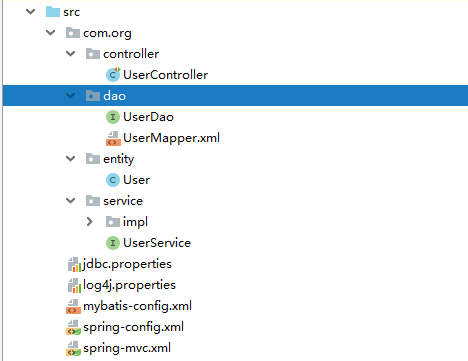
创建工程 创建javaweb工程,目录结构如下:
导入jar包 1.Spring所需包,可在Spring官网下载 找到合适的版本,一把下载4.2以后的版本。
2.log4j所需jar包,下载Apache Log4h 点击.zip文件下载,解压后即可使用
3.Mybatis所需jar包,Mybatis官网
4.数据库连接所需包,点击下载
5.Junit测试所需包:点击下载
创建实体类User 1 2 3 4 5 6 public class User private Integer id; private String name; private String password; }
创建Dao接口以及Mapper映射文件 UserDao
1 2 3 public interface USerDao List<User> findUser (User user) ; }
UserMapper.xml
1 2 3 4 5 6 7 8 9 <?xml version="1.0" encoding="UTF-8"?> <!DOCTYPE mapper PUBLIC "-//mybatis.org//DTD Mapper 3.0//EN" "http://mybatis.org/dtd/mybatis-3-mapper.dtd"> <mapper namespace ="com.org.dao.UserDao" > <select id ="findUser" parameterType ="com.org.entity.User" resultType ="com.org.entity.User" > select * from user where name = #{name} and password = #{password} </select > </mapper >
编写配置文件 以下配置文件全部放在src目录下
数据库配置文件jdbc.properties
1 2 3 4 database.url =jdbc:mysql://localhost:3306/mybatis?characterEncoding=utf8&zeroDateTimeBehavior=convertToNull database.username =root database.password =root database.driverClassName =com.mysql.jdbc.Driver
Mybatis配置文件mybatis-config.xml
1 2 3 4 5 6 7 8 9 10 11 12 13 <?xml version="1.0" encoding="UTF-8"?> <!DOCTYPE configuration PUBLIC "-//mybatis.org//DTD Config 3.0//EN" "http://mybatis.org/dtd/mybatis-3-config.dtd"> <configuration > <settings > <setting name ="lazyLoadingEnabled" value ="true" /> <setting name ="aggressiveLazyLoading" value ="false" /> <setting name ="cacheEnabled" value ="true" /> </settings > </configuration >
Spring配置文件spring-config.xml
1 2 3 4 5 6 7 8 9 10 11 12 13 14 15 16 17 18 19 20 21 22 23 24 25 26 27 28 29 30 31 32 33 34 35 36 37 38 39 40 41 42 43 44 45 46 47 48 49 50 51 52 53 54 55 56 57 58 59 60 61 62 63 64 65 66 <?xml version="1.0" encoding="UTF-8"?> <beans xmlns ="http://www.springframework.org/schema/beans" xmlns:xsi ="http://www.w3.org/2001/XMLSchema-instance" xmlns:context ="http://www.springframework.org/schema/context" xmlns:tx ="http://www.springframework.org/schema/tx" xsi:schemaLocation ="http://www.springframework.org/schema/beans http://www.springframework.org/schema/beans/spring-beans.xsd http://www.springframework.org/schema/context http://www.springframework.org/schema/context/spring-context.xsd http://www.springframework.org/schema/tx http://www.springframework.org/schema/tx/spring-tx.xsd " > <context:property-placeholder location ="classpath:jdbc.properties" /> <bean id ="dataSource" class ="org.springframework.jdbc.datasource.DriverManagerDataSource" > <property name ="driverClassName" value ="${database.driverClassName}" /> <property name ="url" value ="${database.url}" /> <property name ="username" value ="${database.username}" /> <property name ="password" value ="${database.password}" /> </bean > <bean id ="sqlSessionFactory" class ="org.mybatis.spring.SqlSessionFactoryBean" > <property name ="configLocation" value ="classpath:mybatis-config.xml" /> <property name ="typeAliasesPackage" value ="com.org.entity" /> <property name ="mapperLocations" value ="classpath*:com/org/dao/*.xml" /> <property name ="dataSource" ref ="dataSource" /> </bean > <bean class ="org.mybatis.spring.mapper.MapperScannerConfigurer" > <property name ="basePackage" value ="com.org.dao" /> <property name ="sqlSessionFactoryBeanName" value ="sqlSessionFactory" /> </bean > <context:component-scan base-package ="com.org" /> <bean id ="transactionManager" class ="org.springframework.jdbc.datasource.DataSourceTransactionManager" > <property name ="dataSource" ref ="dataSource" /> </bean > <tx:advice id ="txAdvice" transaction-manager ="transactionManager" > <tx:attributes > <tx:method name ="query*" read-only ="true" /> <tx:method name ="get*" read-only ="true" /> <tx:method name ="find*" read-only ="true" /> <tx:method name ="select*" read-only ="true" /> <tx:method name ="*" /> </tx:attributes > </tx:advice > </beans >
SpringMVC配置文件spring-mvc.xml
1 2 3 4 5 6 7 8 9 10 11 12 13 14 15 16 17 18 19 20 21 22 23 24 25 26 27 28 29 30 <?xml version="1.0" encoding="UTF-8"?> <beans xmlns ="http://www.springframework.org/schema/beans" xmlns:xsi ="http://www.w3.org/2001/XMLSchema-instance" xmlns:context ="http://www.springframework.org/schema/context" xmlns:mvc ="http://www.springframework.org/schema/mvc" xsi:schemaLocation =" http://www.springframework.org/schema/beans http://www.springframework.org/schema/beans/spring-beans.xsd http://www.springframework.org/schema/mvc http://www.springframework.org/schema/mvc/spring-mvc.xsd http://www.springframework.org/schema/context http://www.springframework.org/schema/context/spring-context.xsd" > <context:component-scan base-package ="com.org.controller" /> <bean class ="org.springframework.web.servlet.view.InternalResourceViewResolver" > <property name ="prefix" value ="/" /> <property name ="suffix" value =".jsp" /> </bean > <mvc:cors > <mvc:mapping path ="/**" allowed-origins ="*" allowed-methods ="POST,GET, OPTIONS,DELETE,PUT" allowed-headers ="Content-Type,ContentType,Access-Control-Allow-Headers, Authorization, X-Requested-With" allow-credentials ="true" /> </mvc:cors > <mvc:annotation-driven > </mvc:annotation-driven > </beans >
web.xml
1 2 3 4 5 6 7 8 9 10 11 12 13 14 15 16 17 18 19 20 21 22 23 24 25 26 27 28 29 30 31 32 33 34 35 36 37 38 39 40 41 42 43 44 45 46 47 48 49 50 51 52 53 54 55 56 <?xml version="1.0" encoding="UTF-8"?> <web-app xmlns:xsi ="http://www.w3.org/2001/XMLSchema-instance" xmlns ="http://xmlns.jcp.org/xml/ns/javaee" xsi:schemaLocation ="http://xmlns.jcp.org/xml/ns/javaee http://xmlns.jcp.org/xml/ns/javaee/web-app_3_1.xsd" id ="WebApp_ID" version ="3.1" > <display-name > Test</display-name > <welcome-file-list > <welcome-file > login.jsp</welcome-file > <welcome-file > index.htm</welcome-file > <welcome-file > index.jsp</welcome-file > <welcome-file > default.html</welcome-file > <welcome-file > default.htm</welcome-file > <welcome-file > default.jsp</welcome-file > </welcome-file-list > <context-param > <param-name > contextConfigLocation</param-name > <param-value > classpath:spring-config.xml</param-value > </context-param > <listener > <listener-class > org.springframework.web.context.ContextLoaderListener</listener-class > </listener > <filter > <filter-name > encodingFilter</filter-name > <filter-class > org.springframework.web.filter.CharacterEncodingFilter</filter-class > <init-param > <param-name > encoding</param-name > <param-value > UTF8</param-value > </init-param > </filter > <filter-mapping > <filter-name > encodingFilter</filter-name > <url-pattern > /*</url-pattern > </filter-mapping > <servlet > <servlet-name > springmvc</servlet-name > <servlet-class > org.springframework.web.servlet.DispatcherServlet</servlet-class > <init-param > <param-name > contextConfigLocation</param-name > <param-value > classpath*:spring-mvc.xml</param-value > </init-param > <load-on-startup > 1</load-on-startup > </servlet > <servlet-mapping > <servlet-name > springmvc</servlet-name > <url-pattern > *.do</url-pattern > </servlet-mapping > </web-app >
日志信息配置文件log4j.properties
1
2
3
4
log4j.rootLogger =DEBUG, A1 log4j.appender.A1 =org.apache.log4j.ConsoleAppender log4j.appender.A1.layout =org.apache.log4j.PatternLayout log4j.appender.A1.layout.ConversionPattern =%-4r [%t] %-5p %c %x - %m%n
创建Service层接口以及实现类 UserService
1
2
3
public interface UserService List<User> findUser (User user) ; }
UseServiceImpl
1
2
3
4
5
6
7
8
9
10
11
@Service @Transactional public class UserServiceImpl implements UserService @Autowired private UserDao userDao; @Override public List<User> findUser (User user) return userDao.findUser(user); } }
创建Controller层 UserController
1
2
3
4
5
6
7
8
9
10
11
12
13
14
15
16
17
@Controller public class UserController @Autowired private UserService userService; @RequestMapping ("userLogin" ) public ModelAndView userLogin (User user) ModelAndView view = new ModelAndView(); List<User> userList = userService.findUser(user); if (userList.size()!=0 ){ view.addObject("msg" ,userList.get(0 )); }else { view.addObject("msg" ,"密码或用户名错误" ); } view.setViewName("index" ); return view; } }
编写前台页面 因为测试用的,有点丑不要介意
1
2
3
4
5
6
7
8
9
10
11
12
13
14
<%@ page contentType="text/html;charset=UTF-8" language="java" %> <html> <head> <title>Login</title> </head> <body> <form name="form" action="userLogin.do" method="post" > name:<input name="name" /><br/> password<input name="password" /><br/> <input type="submit" > </form> ${msg} </body> </html>
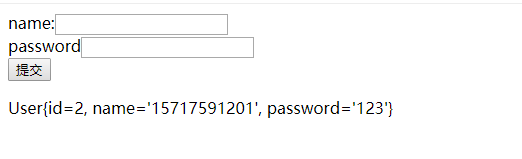
登录成功
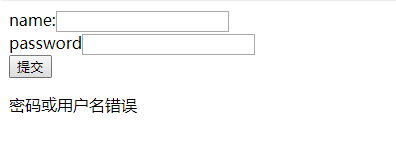
*登录失败 *
注意事项 1.访问controller层时一定要加上.do